Two gates stand before any HarmonyOS code ships: the developer account that matches who you are, and the publish scope that matches what devices you target. Overseas developers — including Hong Kong, Macao, and Taiwan — register and certify on Huawei’s overseas portal; Mainland China developers use the Chinese portal, and the two rails do not interchange. If you need to publish a Huawei HarmonyOS app in Mainland China, Chinaready acts as your landing partner to complete the publishing work end-to-end — and we build the app too, including porting existing iOS and Android apps to a native HarmonyOS app.
This Guide covers both gates as they stand after the HarmonyOS Developer Center launch (2026-10-12), then reports something rarer: a same-day field test of the whole engineering rail on a Mac, where an AI agent wrote, built, deployed, and UI-tested a real HarmonyOS app — on the emulator and on a real HarmonyOS phone.
First gate — which developer account you can have
| You are | Register and certify on | Notes |
|---|---|---|
| Mainland China developer | Chinese portal — developer.huawei.com/consumer/cn | Full Mainland China rail: certification, upload, release |
| Overseas developer | Overseas portal — developer.huawei.com/consumer/en | Registration, certification, and app upload all complete on the overseas site |
| Hong Kong / Macao / Taiwan developer | Overseas portal | The developer alliance does not support certifying these developers as Mainland China personal developers |
- Hard rule — the account rails are directional. An overseas or HK/MO/TW developer cannot become a Mainland China personal developer through the Chinese portal; where your organizing presence sits decides which rail opens.
- HarmonyOS Developer Center — launched network-wide on 2026-10-12 as the merged upgrade of the developer alliance admin center and AppGallery Connect. One-stop surface for HarmonyOS developers: account management, app building, version distribution, quality monitoring, at developer.huawei.com/consumer/cn/hdc-console.
- Console language, locked by certification — a Mainland China developer certification locks your console to the Chinese-language site at developer.huawei.com/consumer/cn, and that console serves Mainland China store releases only. The console is Chinese-language only, with no English interface switch — so Mandarin console ownership is part of the Mainland rail from day one.
This account decision is the same organizing-entity logic that runs through publish an app in China and China mobile app filing — the HarmonyOS rail inherits it rather than replacing it.
Second gate — where users can actually download
| Device category | Consumer service scope today |
|---|---|
| Smartwatch apps | Global — the one HarmonyOS category served worldwide |
| Phone / tablet apps | Mainland China only — release settings may list extra countries, but client download is not provided outside Mainland China yet |
- Release configuration — in the Developer Center under App release > Version information, you choose “all countries or regions” or “specific countries or regions,” and the latter can auto-publish to future newly added regions. Huawei documents the mechanics in configure release countries or regions.
- Cross-border compliance — a release scope that includes non-Mainland regions requires agreeing to the personal-information export authorization statement before submission, and Huawei review checks the app against each target region’s policy and religious/cultural requirements.
- Material differences — non-Mainland releases do not require the electronic copyright certificate, the app copyright certificate, or filing (registration) records. Mainland releases do — the same filing family covered in HarmonyOS NEXT China and the China app store matrix.
Where Chinaready fits — if the account rail or the Mainland-only phone scope is the blocker, that is precisely the landing-partner job: organize the Mainland China publishing rail, carry the filing and store requirements, run the reviewer loops in Mandarin, and keep the release managed. And because we also build HarmonyOS apps ourselves, an existing iOS or Android product can become a native HarmonyOS SKU with the same team that lands it.
The development environment — a macOS checklist
Before any AI tooling, the plain baseline. For an overseas developer building a native HarmonyOS phone app on macOS, this is the environment that works today — human-only, no agent required:
| Component | Requirement | Notes |
|---|---|---|
| Mac | Apple Silicon | DevEco Studio ships a native arm64 build, and since DevEco Studio 5.0.5 the local emulator runs on Apple Silicon only — Intel Macs lost emulator support entirely |
| macOS | 26 is where official support stops today | We ran the whole environment on macOS 27 — IDE, SDK, emulator, real-device debug, and a shipped app — with zero issues, but that is field evidence, not a support commitment |
| IDE | DevEco Studio 26.0.0, Mac (ARM) build | The HarmonyOS SDK (API 26), the hvigor build tool, the ohpm package manager, an embedded Node.js, and a bundled JDK all ship inside the one install — nothing else to piece together |
| Account | A Huawei developer account | Sign-in is required for SDK and emulator-image downloads |
| Emulator (optional) | Phone system image, downloaded from the IDE | Most emulator debugging needs no signing at all |
| Real phone | A physical Huawei handset | If the app targets Mainland China users, the phone must be mainland-version hardware — your mainland users run mainland retail units and their software build, so an overseas-market handset is not equivalent test proof |
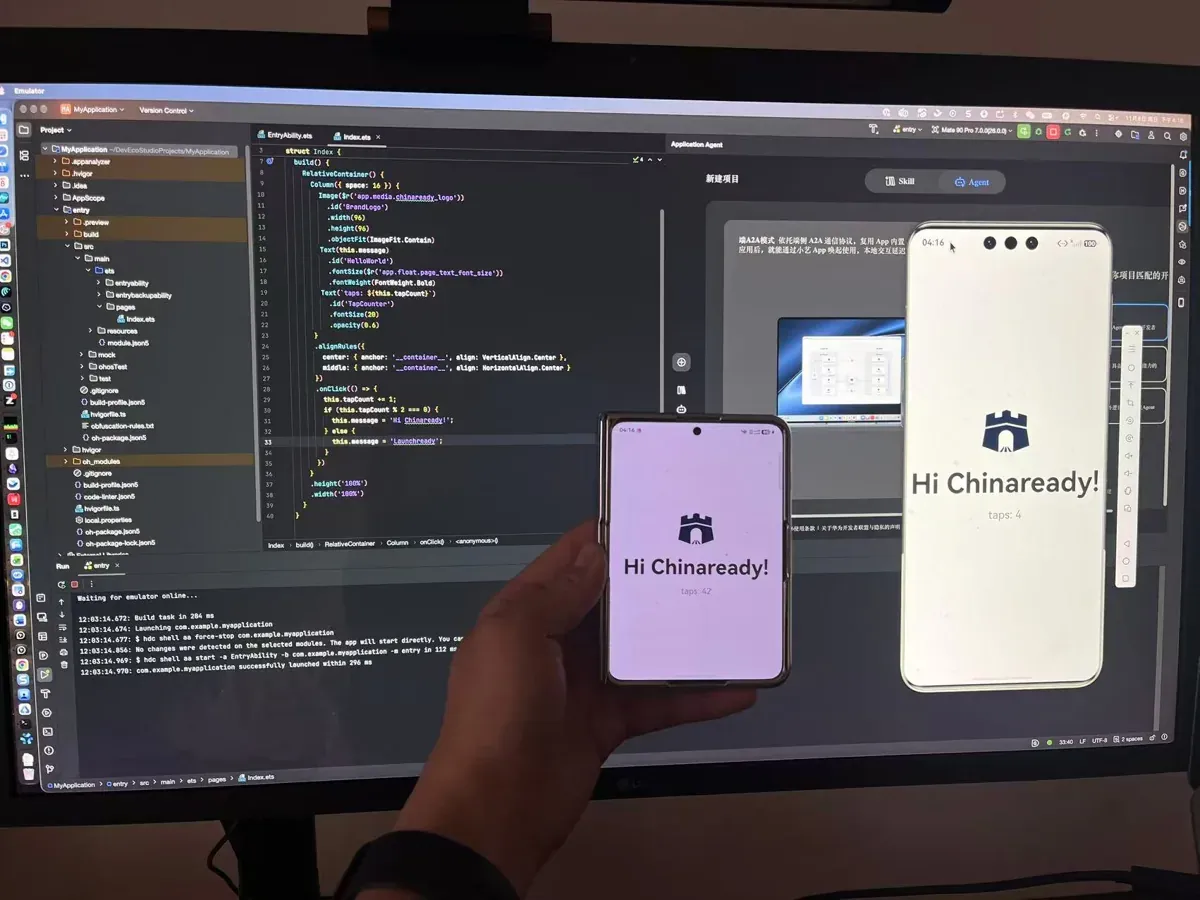 The environment behind this Guide: DevEco Studio on an Apple Silicon Mac with a connected Huawei HarmonyOS handset. Photo: Chinaready.
Field report — agent-assisted development on the same toolchain
With the baseline in place, the operational question this Guide set out to answer: can an AI agent drive that environment end-to-end — writing, building, deploying, and UI-testing a real HarmonyOS app? On the checklist above, the answer is yes, one layer of tooling deep.
The agent stack
Huawei’s DevEco CLI wraps the whole toolchain (ohpm, hvigor, hdc, emulator, hilog) for exactly this purpose — including a built-in MCP server that exposes static checks, symbol navigation, and diagnostics to any AI agent. Against it, hdc gives an adb-equivalent surface: install, activity start, logs, screenshots, UI-tree dumps, and injected taps and swipes.
The loop we ran, in order, on the same day:
| Step | Action | Verification |
|---|---|---|
| 1 | Agent reads the demo project through the MCP language tools | Symbol tree returned for the page component |
| 2 | Agent edits ArkTS code — adds state, a layout column, a tap counter | Static check returns clean |
| 3 | Build and deploy to the emulator and the real phone | Signed package installs and launches; smoke pass |
| 4 | Agent dumps the UI tree and injects a tap | Counter state change confirmed by layout dump and by screenshot |
On AI writing ArkTS — ArkTS is TypeScript with the dynamic escape hatches removed. That is good news and bad news: a strong TS model starts close, but its old habits (any, untyped object literals) are exactly what ArkTS rejects. The working discipline is a compile loop — the agent writes, hvigor and the static checker verify, errors feed back until clean. Published HarmonyOS benchmark work measures the same pattern; our afternoon confirms it operationally: the loop converges, on real devices, fast enough to be a normal way to build.
One honest security note from the field test: the OS refuses to auto-launch an app while the phone is locked — by design, in developer mode. Automation bends around the user, not through them.
Keep or add — the decision this feeds
Whether HarmonyOS deserves a native SKU at all is a separate call: HarmonyOS NEXT China — extra OEM OS publish gate frames when to keep Android + iOS only and when a real HarmonyOS SKU is honest work. What this Guide adds to that decision: the registration and scope rails are now clear enough to price, and the build rail is agent-ready — so the residual cost of “add HarmonyOS” concentrates exactly where a landing partner earns its keep.
What we can offer?
Registering the right account, scoping the right devices, and building the app are one job, not three vendors. Chinaready helps your product team name that job and run the gates that actually ship a HarmonyOS app in Mainland China — or keep it honestly out of scope:
- China Readiness Assessment — Lock whether HarmonyOS is a Mainland China success metric, which account rail and device scope apply to you, and which filing / stay-up packs the HarmonyOS identity needs before a date is promised.
- China Access Acceleration — Keep auth, APIs, and critical deps reachable from Mainland China so a HarmonyOS listing matches a real install-to-value journey on Huawei devices.
- China Product Hosting — Place backends the HarmonyOS app actually calls where Mainland China reachability and filing adjacency stay coherent — without mistaking Huawei Cloud China for the OS gate.
- Mobile App Distribution — Run the HarmonyOS Developer Center rail for your SKU beside Apple China and the Android first wave — separate identities, Mandarin ops, and update cadence.
Chinaready also provides porting development — taking your existing iOS and Android apps to native HarmonyOS apps, from account registration through store release.
Contact us when you need a HarmonyOS registration-to-release path — or an existing iOS or Android app that needs to become a native HarmonyOS app.