

China Network Diagnostics is now live in the Client Workbench. Entitled organizations can run HTTP, PING, and DNS checks from real Mainland China nodes, review a visual summary of the result, and download the full probe table as CSV.
The console is not an anonymous public tester. Access is enabled per Chinaready contract inside Workbench — the same surface where filings, cloud, apps, and delivery already live.
What you can run
The first production release supports three check types:
- HTTP Tests — reachability, status codes, and timing for a target URL
- PING Tests — round-trip latency from Mainland China vantage points
- DNS Tests — how China-side resolvers answer for a host
HTTP Advanced mode adds the controls teams usually need for a real probe: request method (GET, POST, or HEAD) and custom request headers.
How a test runs
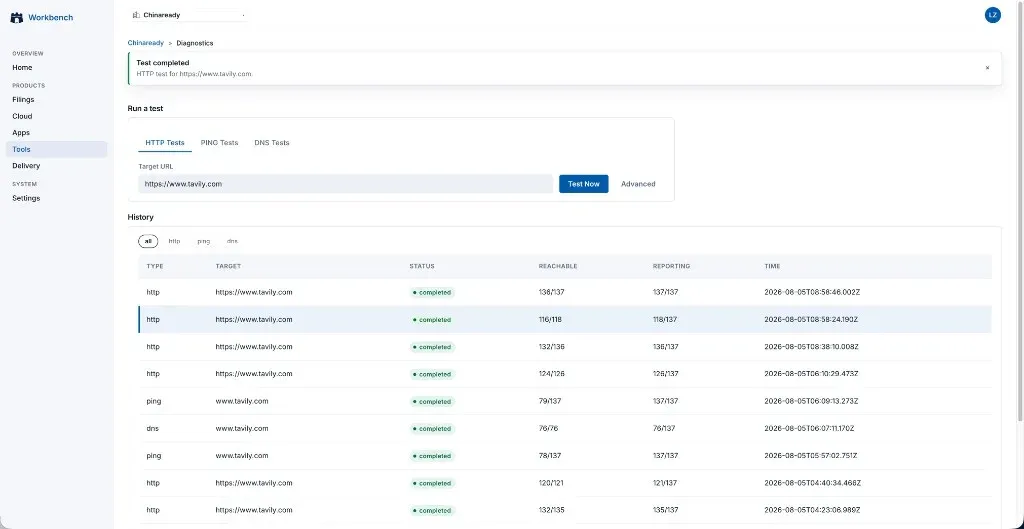
Enter a target URL or host, choose the check type, and click Test Now. The request joins the diagnostics queue — up to 10 tests can be queued at once — and appears in the History list as soon as the run is accepted. When the run completes, open the row to see the summary and detailed results.
Probe coverage
Tests execute on Chinaready infrastructure inside Mainland China. A typical run fans out across 130+ city nodes, covering every province and municipality, with capital cities and major secondary cities on China Telecom, China Unicom, and China Mobile.
That density is what makes the History row’s reachable and reporting fractions meaningful — for example 136/137 nodes reporting on a completed HTTP check — rather than a single synthetic vantage point outside Mainland China.
Result summary
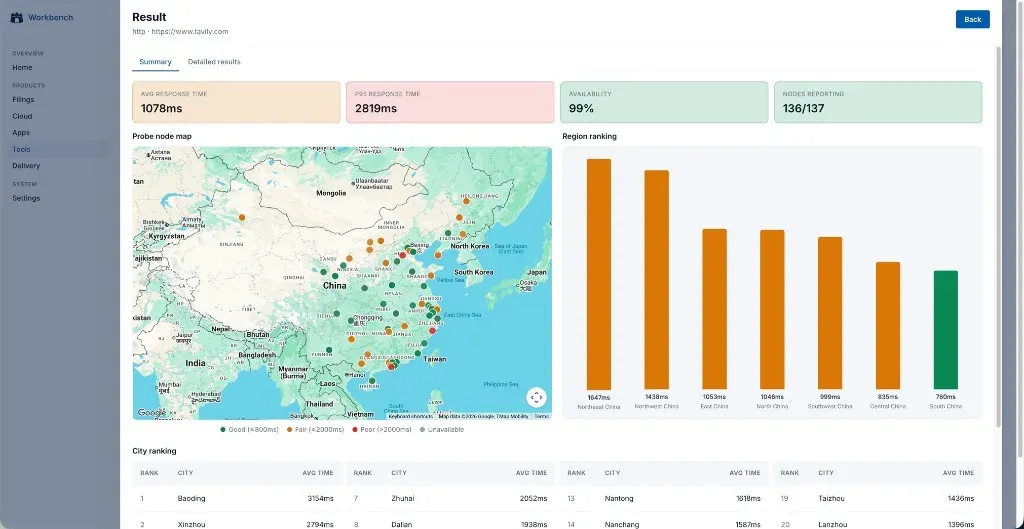
Opening a completed run shows the Summary tab first: scorecards, a probe-node map, regional ranking, and a city ranking ordered from slowest to fastest (worst 24 cities).
For a sample HTTP run against https://www.tavily.com, the summary reported:
| Metric | Value |
|---|---|
| Average response time | 1078 ms |
| P95 response time | 2819 ms |
| Availability | 99% |
| Nodes reporting | 136 / 137 |
The map plots every reporting probe with latency bands (good / fair / poor / unavailable). Region ranking aggregates average response time across China’s seven geographic regions. City ranking surfaces the slowest cities so engineering and ops can see where the experience degrades first.
Detailed results and CSV export
The Detailed results tab lists every probe. Filter by region or ISP, then inspect fields such as city, ISP, resolved IP, HTTP status, total time, DNS time, TCP connect, SSL handshake, TTFB, content download time, download size, and speed.
Export the table to CSV for offline analysis. The sample run below is available as a download:
Download sample detailed results (CSV)
Here are eight of the slowest successful probes from that file (total time descending):
| City | Region | ISP | Status | Total (ms) | DNS (ms) | Connect (ms) | TTFB (ms) |
|---|---|---|---|---|---|---|---|
| Urumqi | Northwest China | China Telecom | 200 | 6811 | 733 | 3047 | 6801 |
| Harbin | Northeast China | China Mobile | 200 | 5340 | 797 | 2009 | 5046 |
| Nanchang | East China | China Mobile | 200 | 3306 | 143 | 2685 | 2939 |
| Kunming | Southwest China | China Mobile | 200 | 3170 | 454 | 2904 | 3113 |
| Taiyuan | North China | China Telecom | 200 | 3078 | 1041 | 2288 | 3038 |
| Chongqing | Southwest China | China Telecom | 200 | 2987 | 132 | 335 | 771 |
| Urumqi | Northwest China | China Mobile | 200 | 2913 | 54 | 276 | 2913 |
| Chengdu | Southwest China | China Mobile | 200 | 2897 | 25 | 354 | 2844 |
Across the full CSV, 116 of 118 probes returned HTTP 200; the remaining two timed out. Coverage spanned all seven regions and all three major ISPs — useful evidence when an offshore product looks healthy in a US dashboard but uneven for users in Mainland China.
Start using Network Diagnostics
If your organization already has Client Workbench access, ask your Chinaready advisor to enable the Network Diagnostics module under your contract. If you are evaluating China readiness and want this tooling in the engagement, contact us — we will help you get started.
For the public product overview, see China Network Diagnostics.